
Burning your audio Master
A common misconception that is held by Audio clients is that the master that they receive from their mix engineer or producer is the ONLY source that should be used. Copies of this master or a previously replicated disc will also suffice. Make at least 5 copies when you are outputting a final production master.
3) For personal use
2) For production ( 1 master and 1 Backup)
This ensures that a raw unblemished copy will be used to create the glass master(stamper) for production on the molding machinery.
It is the policy of Pressing-Media, to replicate source materials supplied by customers exactly as supplied. Our plants do not alter, equalize, re-author, re-order tunes, compress, add titles or text, convert formats, or anything else to customer supplied source material files without client authorization and a signed PMCD master submitted to the plant once approved by the customer.
Standard “Red book” audio discs are defined as:
Sample rate: 44.1 kHz
Channels: 2 (stereo)
Bits per sample, per channel: 16
Levels per sample: 65,536
Total data rate (Mb/s): 1.411
Maximum Standard Run time: 78 minutes ( we have successfully mastered up to 78′ 56″ of run time) but this is called an Oversized master and the Burn lazer that etches the glass master has to be pitched at a lesser angle towards the center of the Glass Stamper. This has been known to cause incompatibility or track loss on certain players (older weaker lasers or dirty lenses) so it is not a warranted process.
Note: Just a heads up, it IS possible but not guaranteed to be 100% compatible
(hey go for the 2 disc set !) 😉 .
Common audio extensions for audio files
• wav – standard audio file container format used mainly in Windows PCs. Commonly used for storing uncompressed (PCM), CD-quality sound files, which means that they can be large in size—around 10 MB per minute. Wave files can also contain data encoded with a variety of (lossy) codecs to reduce the file size (for example the GSM or mp3 codecs). Wav files use a RIFF structure.
• ogg – a free, open source container format supporting a variety of codecs, the most popular of which is the audio codec Vorbis. Vorbis offers compression similar to MP3 but is less popular.
• mpc – Musepack or MPC (formerly known as MPEGplus, MPEG+ or MP+) is an open source lossy audio codec, specifically optimized for transparent compression of stereo audio at bitrates of 160–180 kbit/s.
• flac – Free Lossless Audio Codec, a lossless compression codec.
• aiff – the standard audio file format used by Apple. It is like a wav file for the Mac.
• raw – a raw file can contain audio in any codec but is usually used with PCM audio data. It is rarely used except for technical tests.
• au – the standard audio file format used by Sun, Unix and Java. The audio in au files can be PCM or compressed with the μ-law, a-law or G729 codecs
• .mp3 – What has become the standard file format for the compression of music. Because MP3s significantly compress songs, it is a perfect candidate for distributing on the internet…but it is >>not<< the standard for production masters. Please use uncompressed files (i.e. wav, flac, aiff)
When burning your production masters please always make 2 copies for submission:
1) Original Production Master
2) Back up production master
If for any reason the original master is blemished in transport or insertion/removal from the Glass Mastering Suite a back up will save time and costly overnight courier fees to the plant.
GUIDELINES FOR MASTER SUBMISSION (CD or DVD)
The following is a guide for checking source discs to be certain they are properly formatted for your project.
PC
Load the disc into your PC’s CD/DVD drive and open Windows Explorer (not Internet Explorer). A shortcut to open Windows Explorer is Windows key + E.
Audio CD files have “.cda” extensions as shown below.
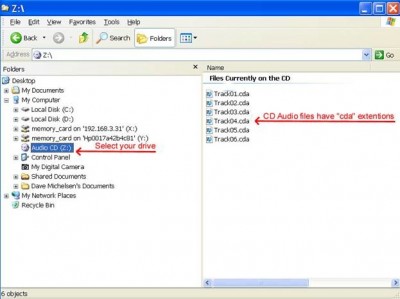
This is how an Audio CD should appear in your explorer window
DVDs consist of .vob, ifo, and .bup file extensions which are always in a VIDEO_TS folder as below.

This is how a properly authored DVD should appear in your explorer window
DDP files are sometimes used to send DVD and CD source materials ( waiver is required ). DDP is an acceptable format for DVD and CD source submission. An example is below.

CD and DVD ROM files can have ANY kind of file extensions as they are the actual files to be accessed and unlike the streaming nature of audio .
Common problems
Common problems are caused by submitting files with the following extensions for Audio replication. Doing so results in ROM-Discs that have stored the files on the CD or DVD-ROM replicas that will not play on CD or DVD players. Some of the following formats will play on your computer but WILL NOT play on DVD or CD players. This is why you must check the disc’s files with Windows Explorer as shown above.
• .mp3
• .wmv
• .wav
• .avi
• .mpg
• .jpg
• .pdf
• .MKV
• and many, many more!
Please check and test this carefully before sending source discs to mastering. If you are not sure, please ask one of our experts at Pressing-Media who is more familiar with what files will work.
Adding CD Text
CD TEXT adds artist and song title information to standard audio CDs. It requires a CD audio player that supports CD text. Usually you will find these players in cars or multi-disc carousel machines. The players usually have a LCD or LED display window which reads the CD text info from the disc. This feature should not to be confused with iTunes or Media Players on a computer (see below). Do not forget to add all your options such as Language (English) choice in your software preferences. Placing n/a in your language causes delays in mastering. The CD TEXT information, coded as characters for maximum efficiency, is contained in the R to W subcode channels in the lead-in and/or program area of a CD.
• Lead-in area: text information about the whole disc and individual tracks.
• Program area: text information for the current track including track title, composer, performers etc. The CD TEXT data is repeated throughout each track to reduce the delay in retrieving the data.
To write CD text information your burning software will either allow or disallow this feature. Check with the manufacturer of both your software and hardware to enable this feature. Pressing-Media fully supports masters with CD text enabled at no additional cost.
With regards to iTunes or Windows Media player running on a computer; once a disc is replicated at Pressing-Media all the discs will contain an identical ‘fingerprint’ id code which will be unique in the marketplace. If you then load up this disc on your computer and run iTunes you can then name the songs, enter artist info, style of music etc. and then use the menu Submit CD Track Names (see image below). iTunes will connect to the CDDB (data base) and attach the song information to the unique fingerprint of your pressed CDs. Since pressed CDs all have the same fingerprint, anyone loading your CD into iTunes will see the track listing information if they are connected to the internet. There is no need to pay anyone extra or do any prior setup for this feature since you can easily take care of this yourself once you receive your discs. Note: iTunes and Windows Media player may access different data bases so multiple submits using each player should be considered.
I hope this was helpful!
Need more advice – Call us ANYTIME!

www.pressing-media.com
Your Pressing Needs
Kelly Warren
Co-Founder / CEO
Toll-Free 1-800-511-8171 x 101
Cell: 604-787-1908
Fax: 1-800-511-8171
kelly@pressing-media.com
www.pressing-media.com
skype: dvdcdmanufacturer
Why you can buy with confidence :
All of your products are produced in state of the art, controlled environments,
using the highest quality materials and manufacturing equipment.
Security, anti-piracy and data handling is all done under strict regulation in
our licensed production plants and mastering facilities. Our Quality Control
department runs software compliance tests on every spindle of discs and
visually inspects every package as it leaves the assembly line.
LIMIT OF LIABILITY: Pressing-Media warrants its products to be free of
manufacturing defects and to comply with industry standards and norms.
In the event a product fails due to manufacturing defect, we will replace
the defective product to its original customer at no cost, or, at our sole
discretion, reimburse the customer for the original purchase price
of the defective goods. In no case will Pressing-Media be liable for
any other cost or value added to defective product.